AmoyPolygonScan
To Confirm the Transactions
Visit PolygonScan for Amoy: https://amoy.PolygonScan.com
Paste Your Wallet Address: Enter your MetaMask wallet address in the search bar.
Check Transactions: Look for any recent transactions. Verify their status and details.
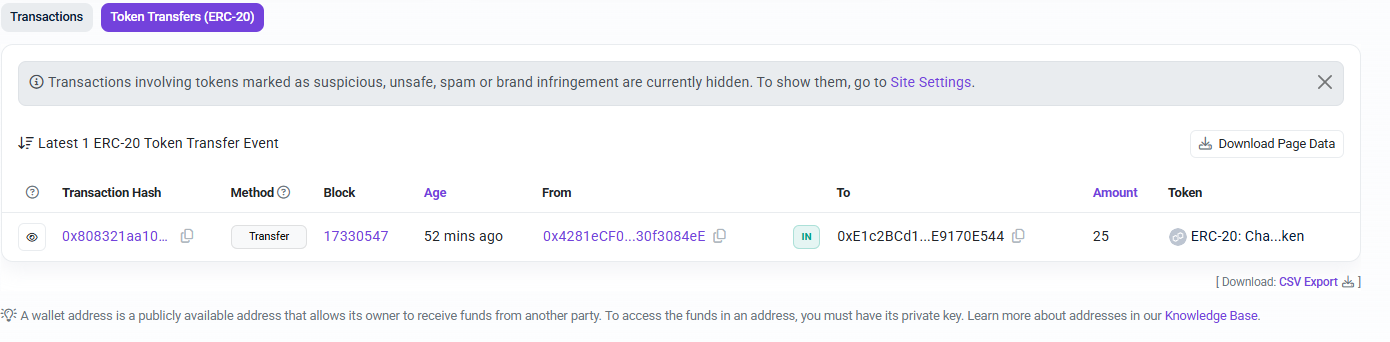
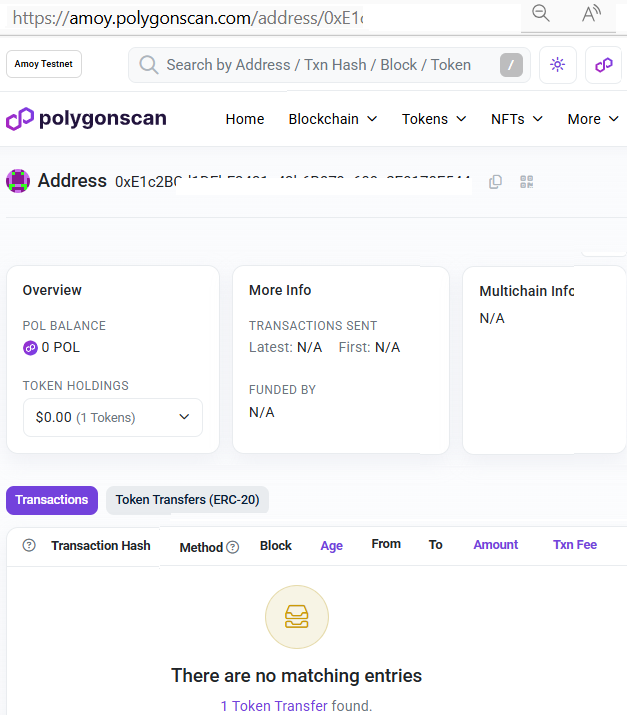 Click on the "1 token transfer found"
 Add Custom Token in MetaMask
Sometimes, tokens might not show up automatically, and you'll need to add them manually:
Add Custom Token in MetaMask
Sometimes, tokens might not show up automatically, and you'll need to add them manually:
Open MetaMask: Launch MetaMask.
Import Tokens: Click "Import Tokens" at the bottom of the wallet overview.
Token Contract Address: Enter the token contract address for the testnet token you're expecting. This can typically be found on official Polygon or testnet resources.

Paste Your Wallet Address: Enter your MetaMask wallet address in the search bar.
Check Transactions: Look for any recent transactions. Verify their status and details.
Click on the "1 token transfer found"
Add Custom Token in MetaMask
Sometimes, tokens might not show up automatically, and you'll need to add them manually:Open MetaMask: Launch MetaMask.
Import Tokens: Click "Import Tokens" at the bottom of the wallet overview.
Token Contract Address: Enter the token contract address for the testnet token you're expecting. This can typically be found on official Polygon or testnet resources.